Please provide following information so we could investigate your issue further:
First, please install the current recommended drivers 531.41 version. You can find this information on the top of this page: V-Ray GPU | GPU rendering by Chaos. Please note that this is the version that is tested and approved by the developers and how it works with V-Ray, so it can be different from the latest version released by NVIDIA.
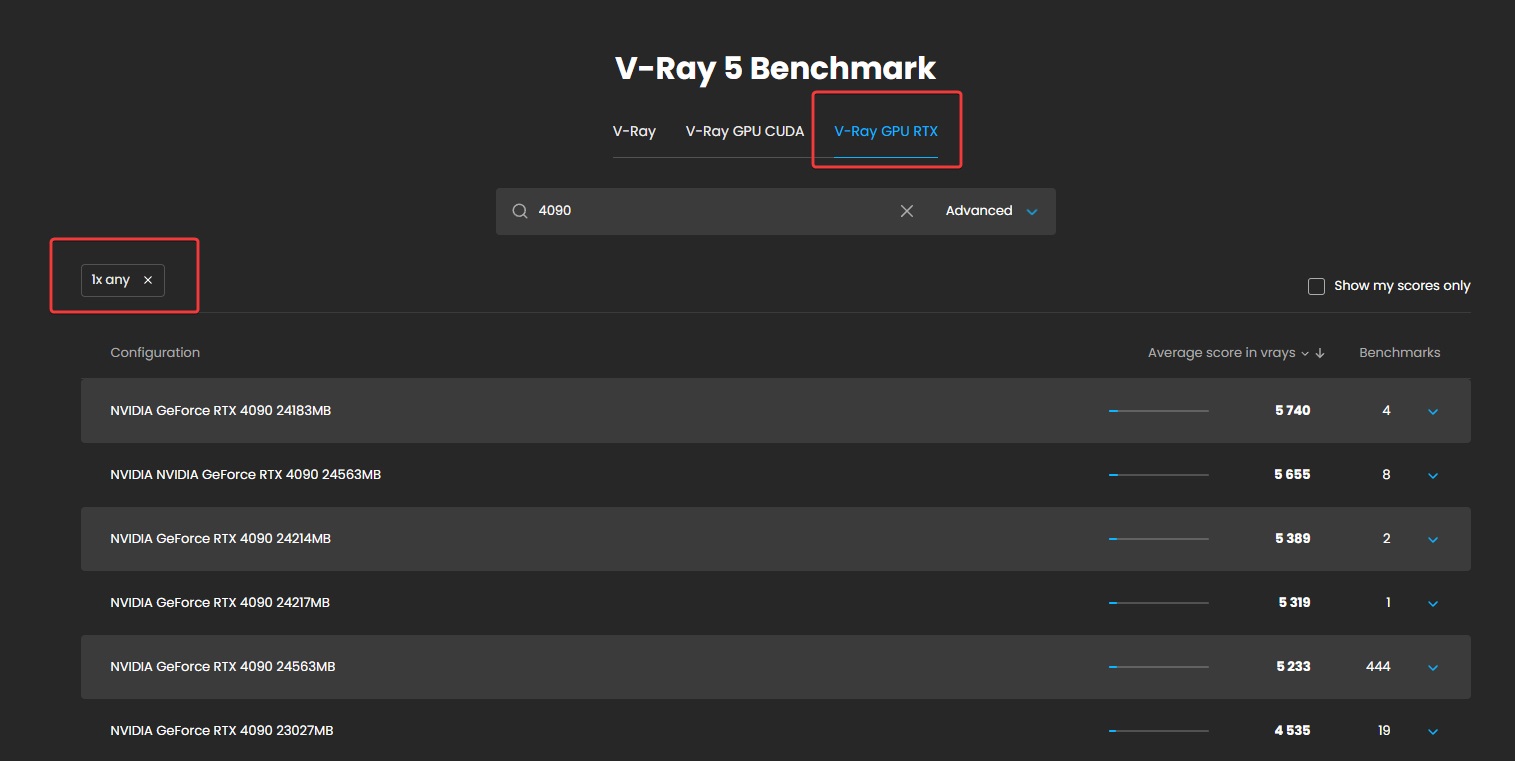
Then please run V-Ray Benchmark in V-Ray RTX mode and share a screenshot of your results.
Apart from that please let us know the exact V-Ray version you have currently installed (Extensions>V-Ray>Help>About V-Ray).
Also please check GPU Device Selection settings, example:
Natasha - Sorry. It was working then I got this error.
		6/13/2023 11:12:36 AM
		Error
		\[V-Ray] There is no device available for rendering!


		6/13/2023 11:29:00 AM
		Error
		\[V-Ray] Exception in CORE: Internal error. Please save and restart as soon as possible!
Thank you @waldob for sharing your V-Ray Benchmark scores. Unfortunately the score you get for both CUDA and RTX is significantly lower than expected.
You can compare your results on V-Ray Benchmark results page to other user-submitted results with the same hardware configurations. For example, the average score for one NVIDIA GeForce RTX 4090 is 5000 vrays: example.
This difference can indicate some hardware issues, which is why I would like to suggest you to test your GPU with other available GPU benchmarking software. You can find some useful suggestions in this article.
Another possibility is a driver issue that was discussed in this forum thread. You can test installing older drivers as suggested in this post and running V-Ray Benchmark again.
While testing V-Ray Benchmark please also run a TechPowerUp GPU-Z to check GPU temperature and record a video with GPU-Z Sensors Tab opened.
If possible, also test current 531.41 with V-Ray Benchmark and GPU-Z as well and let us know the temperatures (video will be most helpful).
Should I download the Game ready driver or the Studio 531.41.
We recommend installing Studio drivers. Also, during installation to ensure deleting previous versions you can click on Custom (Advanced) installation > Perform a clean installation.
Please see examples below:
Exception in CORE: Internal error. Please save and restart as soon as possible!
Can you please also test a new empty scene and any other of your scenes? Do you get this error in every scene?
Like what my colleague Natalia suggested, your scores for both V-Ray RTX benchmark and D5 render Benchmark is lower than expected. Nearly half of what you should expect out of your GPU. This is because of a performance bug in the current drivers, we have been working closely with Nvidia to find a solution. This performance bug happens on GPUs connected to monitors, which I think it is in your case.
Do a clean install like the screenshots Natalia posted above
Restart your machine when the new driver is installed(important)
Go to Nvidia Control Panel, Manage 3D settings, change Power Management mod to Prefer Maximum Performance then click Apply. See the screenshot attached
Run the Benchmarks again and post the results here
If you still have low scores we will schedule a remote session with Team Viewer to check your setup


 I have spend allot of money on my new upgrade - finally can use it to its full potential.