Hi,
I have been using the Contours render element in previous versions of V-Ray by:
- Activating Contours in the Settings windows
- choosing the Render Element only in settings
- adding it as a VFB layer in compositing mode, with blending set to subtract (to get black lines onto the RGB channel) and adjusting its opacity to set contrast.
But I can’t get it to work in the latest version of V-Ray 6 update 2…
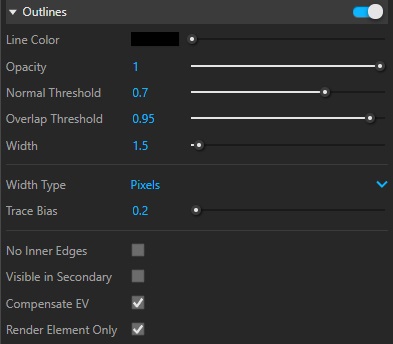
The Contours element has been renamed outlines, but my previous workflow does not seem to add the desired effect to the RGB layer in the VFB.
Attached are my settings in V-Ray 6.2
Could you please clarify the correct workflow to add render element outlines to the final image?
Best regards,
Thibaut
Hello @Antioche ,
Please try the following settings.
If you need white or colored Outlines:
- Add Outlines Render Element;
- Enable Outlines in settings > enable Rendel Element Only;
- In Composite ass Outlines on top of RGB color render element;
- Change Outlines Blending to Add and set Multiplier to 50;
- Change Multiplier color if needed.
If you need black Outlines:
- Add Outlines Render Element and enable Invert ;
- Enable Outlines in settings > enable Rendel Element Only;
- In Composite ass Outlines on top of RGB color render element;
- Change Outlines Blending to Multiply and set Multiplier to 50.
Both examples are created with default Outlines settings.
Hi Natalia,
Thanks for the heads up.
I have followed your instructions for creating a black outlines overlay, but the resulting Outlines render elements created a very bright image, instead of the expected black lines on white background.
As result, the compositing procedure you recommended results in washed out outlines, instead of black ones.
What do you think is the problem?
cheers,
Thibaut
@Antioche , would it be possible to share your scene so I could take a look?
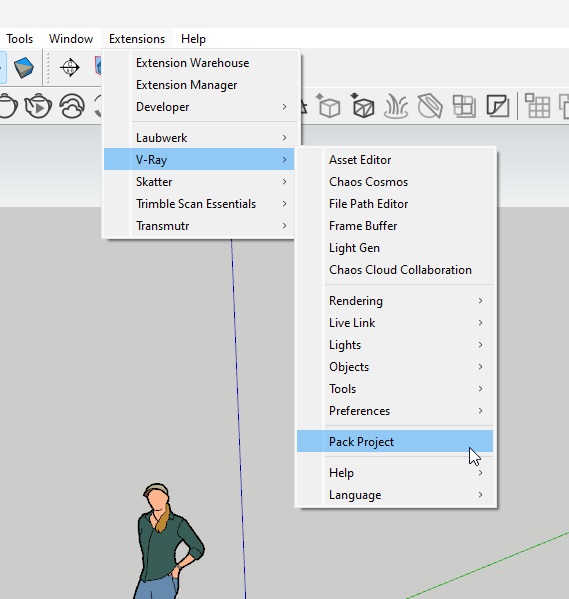
If this is alright, please open a ticket using this submit request form and upload the archived scene in the ticket. Make sure to archive it with the Pack Project tool (Extensions>V-Ray>Pack Project tool).
Ticket submitting, as requested:
Best regards,
Thibaut
Thanks to @Antioche we have identified an issue with Outlines Render Element. Currently it is being affected by Exposure values, moreover results with Progressive and Bucket image samplers differ.
The issue is logged in our internal system as SK-4658, both this forum thread and your ticket is linked to it. Thank you for your report!