Not sure where this goes BUT - has anyone gotten hybrid rendering working on ec2 spots? I’m using deadline and the vrscene submitter, selecting “vray rt (cuda)” as the render engine, however, the linux AMI’s are giving errors and failing. I sort of assumed they would kick over to just cpu, but that doesn’t seem to be the case. Just curious if anyone has had any luck
2018-03-20 22:48:59:  0: STDOUT: [2018/Mar/20|22:48:59] Loading light map from file "/mnt/Data/U4de81062dd1a43b3b551c71b9468c33b/SHEPLEY/15-NOTRE-DAME/3d-cad/textures/DRAFT1_ADD.vrlmap"...
2018-03-20 23:04:59:  0: STDOUT: [2018/Mar/20|23:04:59] Light map loaded successfully.
2018-03-20 23:04:59:  0: STDOUT: [2018/Mar/20|23:04:59] Running RTEngine
2018-03-20 23:04:59:  0: STDOUT: [2018/Mar/20|23:04:59] Initializing CUDA renderer (single kernel version)...
2018-03-20 23:04:59:  0: STDOUT: [2018/Mar/20|23:04:59] NVIDIA CUDA not found. V-Ray GPU can run with C++/CPU device only
2018-03-20 23:04:59:  0: STDOUT: [2018/Mar/20|23:04:59] Querying for CUDA devices...
2018-03-20 23:04:59:  0: STDOUT: [2018/Mar/20|23:04:59] Using all available CUDA GPU devices. Not using CUDA CPU, it should be selected explicitly!
2018-03-20 23:04:59:  0: STDOUT: [2018/Mar/20|23:04:59] error: There is no device supporting at least CUDA 2.0!
2018-03-20 23:04:59:  0: STDOUT: [2018/Mar/20|23:04:59] warning: initDevices() failed. Please check that your system has compatible GPU devices installed.
2018-03-20 23:04:59:  0: STDOUT: [2018/Mar/20|23:04:59] Average rays per light cache sample: inf (min 1, max 1)
2018-03-20 23:04:59:  0: STDOUT: [2018/Mar/20|23:04:59] Using premultiplied light cache.
2018-03-20 23:04:59:  0: Done executing plugin command of type 'Render Task'
any hints on nomenclature? I tried every variation I could think of in the command line box, but nothing seemed to work (call caps, lower case, just intel, just c++, just cpu, etc etc)
This is an environment variable that needs to be set before running V-Ray itself; it?s not a command-line option (we should probably do that though). Depending on which Linux distribution and command shell you are using, the environment is set up differently. For bash, it would be something like export VRAY_OPENCL_PLATFORMS_x64=c++/cpuAnd then you can run V-Ray as normal.
Yeah, I have no idea either. Don’t even know how to find out which distro these AMI’s are running. I’m trying to hash it out with thinkbox, but no solid progress to report yet - still not sure how to pass the command thru. They are recommending as an environmental variable, but for the life of me, I can’t figure out the exact phrasing:
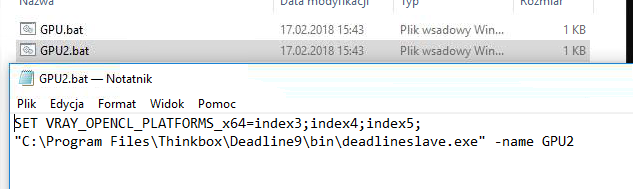
They way I do that is by starting Deadline Slave from batch job, though this is in Windows, but before I start it, I override the env var for devices. I’m pretty much sure it would work the same in Linux.
That’s how it looks on my end - http://www.dabarti.com/screens/s67ca…060255bd9Z.png . The env var is passed to child process (to deadline slave and than to vray.exe).
Alternatively you can set env var globally for the whole job: vhttp://www.dabarti.com/screens/s2baf7205-8141-4005-a5c5-b052cee997e5Y.png