Does the LightMix render element work with Chaos Cloud Renderings? I rendered an image on the cloud, and then imported the .exr file into the frame buffer, but there’s no LightMix option. Thanks
Hi @wes_tran
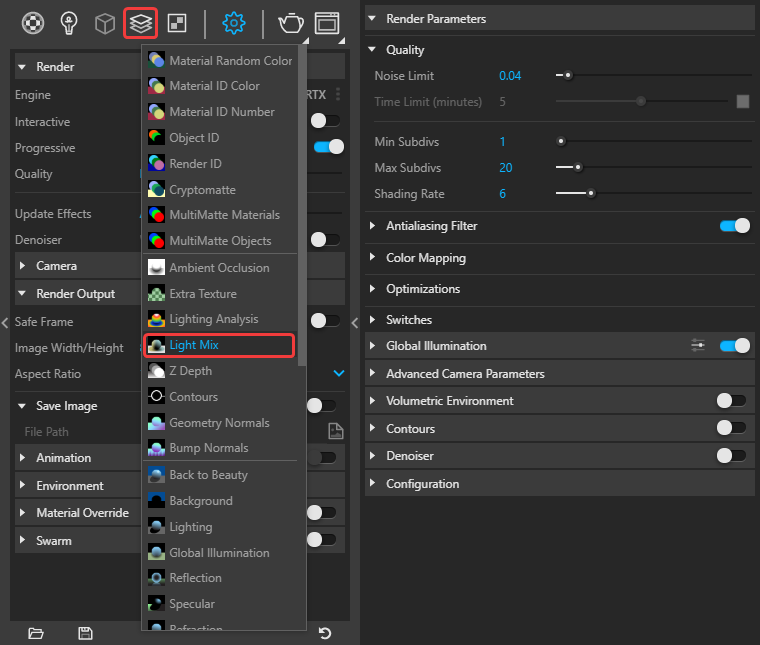
First, make sure you’ve selected the LightMix render element, and also enable the Multichannel option from the Save Image > Image Options in the V-Ray Asset Editor. Once the EXR is finished, you can load it into the VFB, call up the Light Mix render element, and make your adjustments.
If that’s not working for you, can you please provide more details and example screenshots/recordings demonstrating the issue. You might also share the Cloud job ID along, or pack your project via Extensions > V-Ray > Pack Project and forward it through our contact form (make sure to mention this thread in the email). Thanks!
Hi I have the same exact question. May I ask if you can be more specific please? Where the above settings are accesible from? I guess these should be set before the file is sent to the cloud? so I reckon through the render setup menu?
Thanks
Hey @DimiMala ,
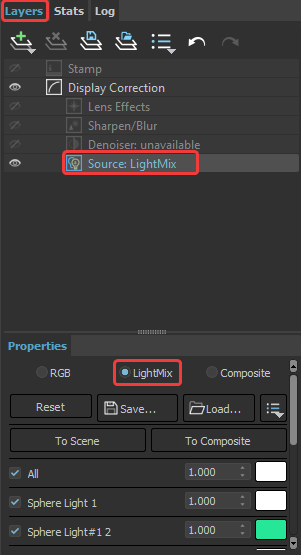
I was referring to the V-Ray Asset Editor (in SketchUp) options. Assuming you’re using 3ds max, you should again add the Light Mix render element from the Render Settings dialog > Render Elements > VRayLightMix - see attached screenshot. Once you submit to Chaos Cloud and the rendering is finished, you will be able to download a zip file with all the output files - you can load back the .exr image in the VFB, go to the Source:RGB layer and switch to LightMix so you could adjust your lights.

If you click on the Source:RGB layer (last one) in the VFB, you should be able to switch to Source:LightMix afterwards and do your adjustments.
Oh!
That’s great thank you very much!
Can you explain it further for V-ray for Sketchup? I can see no box where I could check the Multichannel option on. Only File Path and File Type under Save Image section.
Hello @Areczan ,
When submitting a scene from V-Ray for SketchUp to Chaos Cloud, all you need to do is to add the Light Mix render element before submitting the job. Then, you can submit the job, and once it is done, load the .exr file into the VFB. You will have the Light Mix render element and will be able to make your adjustments. Keep in mind that in the Layers tab, you might need to switch the Source from RGB to LightMix as shown here. I hope this is of help.
Hi @aleksandar.kasabov
Config:
Sketchup pro 2023 23.0.367 64 bits
Vray for Sketchup 6.00.02
Vray Core 6.00.21
Vray NeUI 5.0.2
Vray AppSDK 4.00.00
Problem:
I’ve submitted a Vray scene to chaos cloud with an added Light Mix as you suggested with the actual render output parameters.


Even though I think my parameters are correct, when I download the completed render I have multiple EXR files but when opening one of the EXR file into VFB, going into layers and choosing source LightMix, I end up with a black preview with the message ‘‘Please add LightMix RE and re-render’’ in the Properties’ details. It appears that the steps you are describing don’t work for me.
Am I doing something wrong in my configuration before sending the scene to Chaos Cloud or my issue is once the render is completed? Using the Batch image processing doesn’t seem to help either.
Thanks!
Hello @julie_richard ,
Apologies for the delayed reply.
In order for you to be able to use the light mix, please make sure to enable the Multichannel option in the Render Output options as shown here. Then all layers will be saved to a single .exr file and you will be able to load it into the VFB and tweak the lights. Let me know if that helps.
I always thought that you have to save as a VRIMG file in order to be able to access LightMix in the VFB, no?
Hello @ValeroStudio ,
You can either use.vrimg or multichannel .exr files to access lightMix in the VFB.

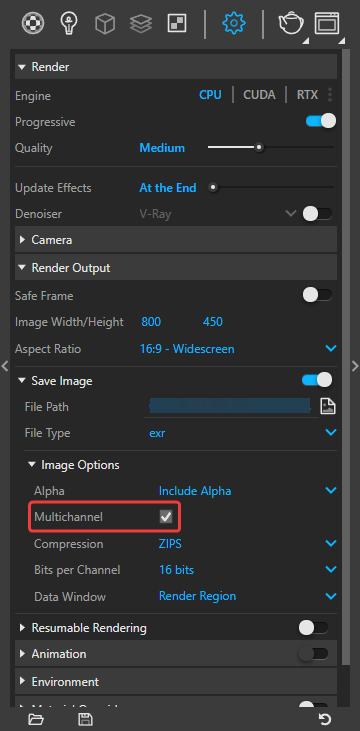
Ok, I solved it. I was not saving with multi-channel check box turned on even though when you save EXR you do get all the channels regardless of whether the box is checked, but I assume some other things happen under the hood when it is enabled. This is good to know! Thanks.
Yes, that is correct. You need to have the Multichannel option enabled in order to be able to load LightMix back to the VFB.