Hi, lately there are watermarks appearing in my renderings. And this is happening randomly. After re-rendering its gone.
This is very annoying if you are rendering animations. See the picture beneath. Is this a connection issue to the licence server?
Could you please specify the exact versions of V-Ray, Cinema4D, and your OS?
Also, could you please try borrowing your licenses for offline use and let me know if you still experience this issue? You can find more information on how to borrow your licenses here.
I’ve experienced it also - just a few times, only in preview rendering, not final. But was also wondering what caused that?
think it might happened after a new vray update, seen it also after 5.2 installation.
Hi Aleksandar,
the last time I experienced it was with VRAY51024 from November the 5th.
Until now I couldn’t reproduce it but I’m glad that I’m not the only one.
I’m using Vray 5.2 (R23.110, Windows 10 Pro 64-bit) now and will tell you when it happens again.
Thank you for the provided information. Our developers will be looking into this and we will let you know once we have more information. Until then, please try borrowing your license for offline use and let me know if that helps. Thank you.
In animations there is a second problem that occurs with the watermarks: the camera is shaking!
I made a short video to show you here.
After long rendering times (sometimes 10 hours, sometimes after 2 days) this shaking comes randomly. Stopping the rendering and restarting solves this issue for some time.
So testing causes a lot of time for me!
It seems to happen while rendering simultaneously in DR (via render-manger without local machine) AND picture viewer (only local machine).
So you might ask why I’m rendering simultaneously? DR often makes no sense WITH the local machine included because all the clients need too long to prepare and don’t start because the workstation already finishes the frame. So no clients is working. I already posted about it here.
So please tell me how can I render animations with all the nodes (I’m paying for 5 nodes) AND local machine without having issues like this?
I’m getting more and more trouble with my customers.
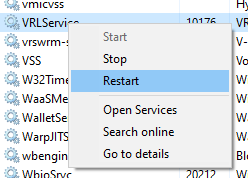
The issues with the camera shaking and the watermarks are connected. Could you please try restarting the license server (open the Task Manager, go to Services, find VRLService, right-click it, and “Restart”)? Let me know if that helps.
Can we set up a remote session so I can investigate what might be the issue? I have sent you a DM with more details.
Also, can you please specify if this issue only happens when rendering with DR or if it also happens if rendering locally? Have you tested both CPU and GPU rendering? Thank you.