Every time I try to export anything from cosmos in C4D, it gives me this error. It has only started happening recently…what is going on?

Hello @howelaw ,
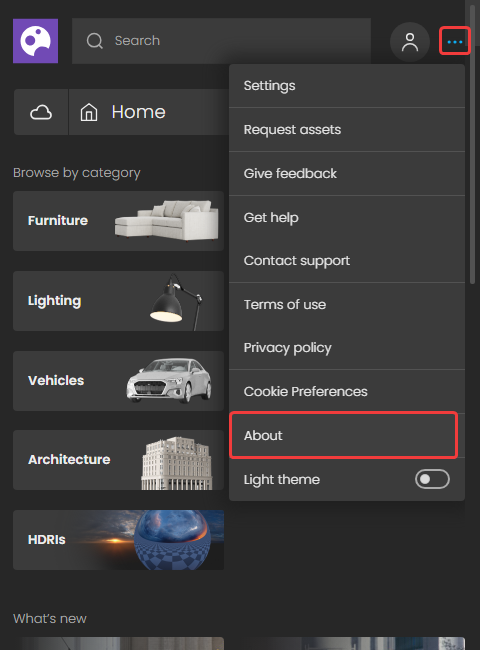
Are you trying to import the asset via the Cosmos browser inside Cinema4D or through your browser (visiting http://localhost:30305/)? Also, please specify the exact versions of V-Ray, Cinema4D, and the Cosmos browser (go to …> About). Do you experience this issue with any assets or only selected ones? Thank you.


Hello,
This seems to be a bug and I have already reported it (bug ID: GALAXY-2405) to our developers for fixing. I will let you know once we have updates on the matter. Thank you.
Hello,
Please note that this issue was recently fixed and you shouldn’t see any unsupported assets in the Cosmos browser.
Please let me know if you need further assistance.
@aleksandar.kasabov In my browser i have this message and I have more materials then via the Cosmos browser inside Cinema4D.


Hello @craveiro ,
It is expected to see more assets when you access the Cosmos browser via your Internet browser as you will then be able to see all available assets. When you access the browser inside Cinema4D you will only see the assets, compatible with V-Ray for Cinema4D. I hope this makes sense.
Hello @aleksandar.kasabov I thought it would be available for all platforms, in which case I hope you add more materials for V-Ray Cinema4D as they are very useful, thank you.
Hello @craveiro ,
We are working on constantly expanding our asset library and we will be adding more materials in the future. However, some assets are optimized for specific platforms/ V-Ray versions, and in those cases the assets won’t be visible everywhere. I hope this is of help.
The Cosmos Browser don’t work anymore since the last two updates.
I can open it but can’t do anything.
It seams to be freezed.
My specification: C4D R21 / Mac OS 11.6.7


If I click anything nothing happens
Hello @Rickmc ,
Could you please open a support ticket about this issue via our contact form? Please describe the issue and send us the cb.log file, which should be located here:
/Library/ChaosGroup/ChaosCosmos
@aleksandar.kasabov Done, thank you
I’m getting an error with V-ray 6 and Cinema 4D 2023 that says “error importing asset. The selected importer was not found”. This is using the Cosmos browser in C4D:

Hello @GMTJay ,
Could you please check if there are any available Cosmos updates and if yes, please update the Cosmos browser to the latest available version? Are you able to import any assets from the Chaos Cosmos web service? Please also specify your OS. Thank you.
Hi Aleksandar,
After several days of it not importing any assets (even hdris), and not doing anything at all to it, it now seems to be working. So, I guess whatever it was resolved itself.
Thanks,
Jay
Hello @GMTJay ,
I am glad to hear that you managed to resolve the issue.
Should you need any further assistance, please don’t hesitate to let us know.