Hi Guys,
Hope you are all well. I am doing a special brick wall with enmesh, is working but:
I would like to show different materials in the imported group, but the material is applied to the enmesh surface, ideally I would like for the mortar to have a different color than the bricks.
Is there a solution ?
Thanks to everyone who read and reply !
Dear @giacomo_testi , hello.
Excuse us for the delayed response!
Something similar was discussed for Enmesh in V-Ray for Rhino, please see here.
I will describe how to achieve it in V-Ray for SketchUp:
- Assign two different materials to the two chosen groups (in your case white = Bricks & yellow = Mortar)
- Choose the whole module and make it a Component
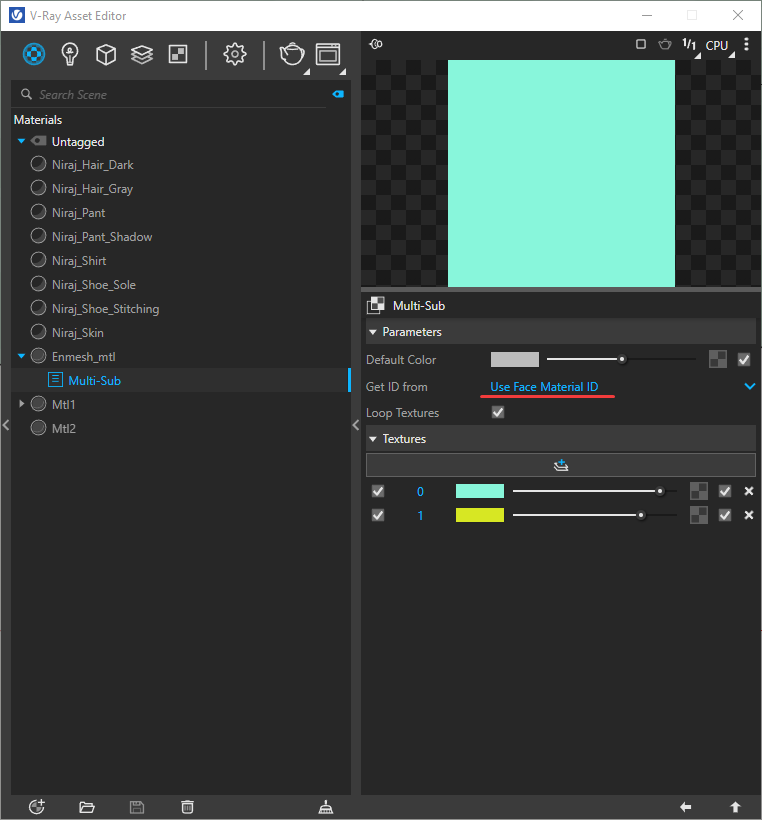
- Assign to the facade new material with Multi-Sub Texture into the Diffuse slot and ensure 2 slots
- For Get ID from choose Use Face Material ID (information how is generated exactly could be found here + example from V-Ray Asset Editor)
- Perform a test render to see how the Texture channel colors are applied
- Assign Textures to the Multi-Sub Texture channels (as you want them to be)
- Render
Please test on your side and give us feedback.
Best regards,
TS
Hello
I just created a Multi-Sub Texture, for enmesh, step by step as you wrote above. I have only one question - is it possible to add only a “bitmap” to the texture slot in Multi-Sub - no material (with reflection, refraction, bump …)? What to do, if I need to add atc. some reflection?
Best regards
L
Dear @ingarch_ladislav , hello.
Excuse me for the delayed response.
In the slots of Multi-Sub Texture we are able to add only Textures, as its name prompts.
Perform steps 1 and 2 and then use Multi Material - similar to the example shared earlier in the V-Ray for Rhino thread.
Pasting the link again here.
If you have any issues feel free to share with us a test scene to take a look.